
Have you ever wondered who actually executes your PL/SQL code when a user clicks a button in your Oracle APEX application?
If you look at your APEX session, it says “JOHN_DOE” or “ADMIN” or whatever user is logged in. But if you look inside the Oracle Database while that button is being pressed, you won’t find John Doe anywhere. Instead, you’ll see a mysterious figure lurking in the background: APEX_PUBLIC_USER.
Let’s demystify who this invisible gatekeeper is, why it matters for your database security, and look at a real-world scenario were forgetting about this user can completely break your application.
Who Is APEX_PUBLIC_USER?
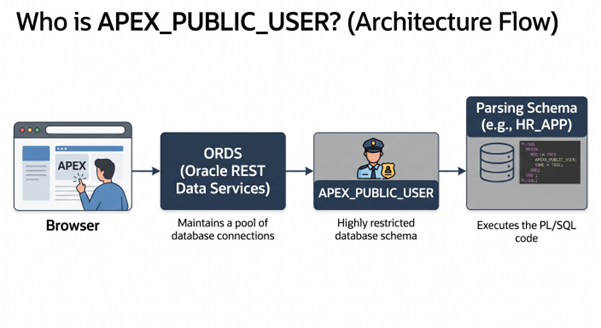
When a user accesses your APEX app through their browser, they aren’t connecting directly to the Oracle Database. Their request goes to ORDS (Oracle REST Data Services).
ORDS maintains a pool of database connections, so it doesn’t have to spin up a new connection every single time someone clicks on a page. To log into the database and establish this pool, ORDS uses a single, highly restricted database schema: APEX_PUBLIC_USER.
Think of your APEX app as a high-security office building. Your end-users (JOHN_DOE) are visitors. APEX_PUBLIC_USER is the building’s trusted security guard. The guard unlocks the front door, verifies the visitor’s badge, and escorts them to the specific room (your APEX app) they are allowed to see.
The Real-World Problem: “But It Works in SQL Developer!”
Every APEX developer eventually hits this wall. You write a beautiful PL/SQL process that references a custom table or executes a packaged procedure in another schema. It works perfectly when you run it in SQL Developer or TOAD.
But the moment you run it inside your APEX application? ORA-00942: table or view does not exist or PLS-00201: identifier must be declared.
Why Does This Happen?
Because when your APEX page processes run, the database parses them under the authority of APEX_PUBLIC_USER acting on behalf of your parsing schema. If your parsing schema relies on roles (like DBA or a custom APP_DEVELOPER role) to see other tables, it will fail in APEX. The APEX engine ignores standard database roles during page execution for security reasons.
The Working Fix: Grant + Synonym, Step by Step
Let’s say you’re APEX application’s parsing schema is HR_APP. You need to pull real-time financial data from a table named INVOICES owned by a completely different schema called FINANCE.
If you try to write a standard SELECT in APEX, it will throw an error unless you explicitly grant privileges. Here is exactly how to solve it:
Step 1: Connect to Your Database as FINANCE (The Data Owner)
Run this statement to grant direct privileges to your APEX parsing schema (HR_APP). Notice that we do not grant it to a role; we grant it directly to the schema.
— Execute this as the FINANCE user
GRANT SELECT, INSERT ON FINANCE.INVOICES TO HR_APP;
Step 2: Create a Synonym in Your APEX Parsing Schema
Now, log into your APEX parsing schema (HR_APP) and create a synonym so your APEX app can reference it easily.
— Execute this as the HR_APP user (Your APEX Parsing Schema)
CREATE OR REPLACE SYNONYM INVOICES FOR FINANCE.INVOICES;
Now, inside your Oracle APEX Page Designer, you can safely write:
SELECT invoice_id, amount, customer_name
FROM invoices
WHERE status = ‘UNPAID’;
Because APEX_PUBLIC_USER can proxy into HR_APP, and HR_APP has direct (non-role) access to that table, your app runs flawlessly!
Try It Yourself: The APEX_PUBLIC_USER Challenge
Now it’s your turn to test your knowledge and get your hands dirty.
Log into your local Oracle database using SQL Developer or SQL Workshop.
Check the account status of APEX_PUBLIC_USER using this query:
SELECT username, account_status FROM dba_users WHERE username = ‘APEX_PUBLIC_USER’;
The Question: What happens to your entire APEX environment if someone accidentally locks this specific user account or its password expires?
Try it (safely in a test environment!): Lock the account and try to load an APEX page. What specific error does ORDS throw back at you?
Drop your answers and thoughts in the comments below! Let’s see who gets the ORDS error code right first!